
jpdennis
-
Posts
700 -
Joined
-
Last visited
-
Days Won
17
Everything posted by jpdennis
-
@who842 Here an older thread concerning midi command differences between the OG and the Stadium. I am not sure if this is an exact scenario for you but it may clarify a couple of items. Please let me know if this helps or if I am way off base. Thanks Dennis
-
 Has anyone followed the following tutorial link for the 10 tutorial videos? While it may not be exactly the learning path some may want it is free for now.
- 10 replies
-
- 1
-

-
- helix
- documentation
- (and 2 more)
-
Gain reduction meter on Helix Stadium compressors
jpdennis replied to rvroberts's topic in Helix Stadium
@rvroberts Click on focus view on the compressor block. Let me know if that makes sense and you find what you are asking. Dennis -
Sample JC-2C Clone from 2016 JP-2C in Mesa custom combo cab - thoughts?
jpdennis replied to jpdennis's topic in Helix Stadium
I will be creating a new clone soon. The goal is that the new one will not be required to reduce post gain. Once I have that one and a channel 2 crunch ready I will see about posting on Customtone. As always, thanks for your help & support. Dennis -
Pinney's Law - Murphy was an optimist. ;-/
-
Are you set to manually connect the Stadium to the app once you log in to the app or are you actually set to automatically connect and it isn't working which forces you to manually connect? Dennis
-
@Wondo100 My first thought is that the Agoura amp models are very easy to use and adjust to taste. Of course Is there an specific real world guitar amplifier you like the tone of? And/or is there a guitarist you are wanting to emulate as far as tone? I have used the Tonex with my Stadium XL and, while I like it, I am also using proxy to model two of my amps and getting quite good results based upon the tone I like - it is of course all subjective. As to the combined use question - One of the other guitarist at church has been using the Tonex with the Stadium XL and just purchased the newest Tonex Board which he used last Sunday. He swears by it. Here are two links for two different very well know musicians in the industry regarding your question. Both from 9 months ago. Have fun - Dennis
-
Sample JC-2C Clone from 2016 JP-2C in Mesa custom combo cab - thoughts?
jpdennis replied to jpdennis's topic in Helix Stadium
That is, if I get any feedback. -
Why is it so hard to find instruction to perform backup?
jpdennis replied to boynigel's topic in Helix Stadium
@boynigel Yea, I hear you. I have a card reader for multiple physical sizes of SD Cards. I will periodically use the Maintenance screen to eject the SD card. I then use the reader to backup to my USB drives and a special backup hard drive I have. It may be a little convoluted but it does work well. Also, at one point it was suggested backing up the complete folder structure of the SD card this way. It helps if you format a new SD card and the folder structure is not rebuilt. The only "at once" trick I found does not backup global settings. However, if I highlight all my presets and perform an export it does backup all the preset individually at once. It DOES NOT ask if you want to over right any existing however. Dennis -
Why is it so hard to find instruction to perform backup?
jpdennis replied to boynigel's topic in Helix Stadium
@boynigel Look at the bottom of the online manual for "Helix Stadium Maintenance" (and I have included the direct link below). It has more maintenance features including how to backup. https://manuals.line6.com/en/helix-stadium/live/helix-stadium-maintenance Hope this helps Dennis -
Sample JC-2C Clone from 2016 JP-2C in Mesa custom combo cab - thoughts?
jpdennis replied to jpdennis's topic in Helix Stadium
@silverhead Thanks for the suggestion. I haven't yet. For now I just wanted the forum users to see if they find this interesting. It sits well in the mix for me. However, I am a woody kind of mid boost guy. All my Mesa amps since 1974 gave me what I liked that way; I've had . This JP-2C seems to be clearer than the stock Line 6 Helix SXL amp + cabs. It could very well be the EQ1 settings on the JP-2C Combo I used. Next time I clone I will have to reduce the level about -5dB below unity or maybe even more. I had really attacked the strings with a power chord and thought it was slightly below unity in the green. What I forgot was I was at the 7 setting on all controls of Les Paul and should have at the very least set the volumes to 10. When I get more feedback I may post to Customtone. Dennis -
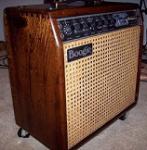
All, I am attaching a clone I just completed using a Premium Bubinga Wood Combo Cab with a 12" Black Shadow (Celestion) that Mesa built for me. The Clone is a little hot so you can reduce the post gain to better sample if you'd like. This is a very clean patch for use with my 1970 Gibson customized Les Paul which has two reworked 1959 humbuckers I had since about 1974 sitting in a darn spare parts bin. They were installed along with the bumble bee caps about 2018. I made the clone using LP pickup selector switch in the middle and vol & tone pots set to 7 (yes all four). I put note in the clone but had no where to put the JP-2C EQ1 settings Dennis Clean 2C.clone
-
@Kryz87 Since I don't have all your connection details I may be repeating what you've already done. I had to use a USB-C to USB-C cable connector from workstation to Helix Stadium XL. I exported my stem files using 44.1 kHz 32 bit for the audio rate and size. Except for the learning curve of specifics on how to consistently order the files and flags the wav files imported perfectly. The Stadium does the conversion to the rate(s) it wants anyway. I know my rates may not be norm but that is what I found and the sound quality was actually pretty good. Dennis
-
@mrrobinson I do not have anything coming out of those vent slots. I would call Line 6 support and let them address your question, if it was me. Dennis
-
Just for grins, reading the whole info block discussed what 1.3.3 does address, I discovered once I read the whole list in the latest 1.3.3 upgrade section. It actually went with a blow by blow (forgive me Jeff) ************************************************************* Improvements/Bug Fixes in 1.3 Numerous improvements and many, many bug fixes Improvements/Bug Fixes in 1.3.2 Additional bug fixes Improvements/Bug Fixes in 1.3.3 Support for Helix Stadium Native presets Additional bug fixes *************************************************************
-
@boynigel Did you purchase the Suhr microMIDI controller as well? jpd
-
Any way to automate song lyrics with Showcase?
jpdennis replied to littlespaceman's topic in Helix Stadium
@littlespaceman Could you use a different midi channel for the iPad with StageTraxx 3? I do not have StageTraxx so I am just spit-balling here. -
This is probably a good question for Line 6 support. It would be great to hear their answer. I personally like the baility to use the notes feature. That way I remember if I use a single coil or humbucker style guitar as well as the amp type/cab or combo/ tonal setting configuration / microphone if used - etc.
-
@boynigel You could just buy the ferrite clips, knowing your cord's diameter, for getting a few options when using various other types of power cords. https://www.amazon.com/Topnisus-Anti-Interference-High-Frequency-Suppressor-Diameter/dp/B01E6PLXZU?th=1
-
@boynigel What amplifier do you have? I only ask to see if there is some 3rd party interface device that could convert your footswitch signal(s) to MIDI. I found one for my Mark V:35 that works well. My JP-2C has MIDI capability so that was easy. The other way to find out may be to open a ticket with Line 6 support and have them determine if the standard Helix Stadium (non-XL) will work as you want. jpd
-
I could not get my computer USB-A to work with the USC-C on the Stadium. I can't remember right now where in the manual I read this but I can only use a USB-C to USB-C connecter from host to Helix to get this to work. Even using an adapter would not work. Not much of a help but hope you get further than I did.
-
Here is a video for you to watch.
-
If you don't want to use Wi-Fi or it isn't your thing, then you can check the specs in the Helix Stadium XL manual to see if the following link is the hardware you may want to try. I am not nor can I guarantee any hardware will work. But I have heard of users trying various USB-A to Ethernet adapters as the online Stadium XL manual suggests. This i just so you can see a picture of an adapter and determine your best choice. https://www.sweetwater.com/store/detail/USB-Ether--startech-usb31000s-usb-3.0-type-a-to-gigabit-ethernet-adapter?mrkgadid=&mrkgcl=28&mrkgen=&mrkgbflag=&mrkgcat=&acctid=21700000001645388&dskeywordid=2317218003829&lid=92700080591304514&ds_s_kwgid=58700008754779696&ds_s_inventory_feed_id=97700000007215323&dsproductgroupid=2317218003829&product_id=USB-Ether&prodctry=US&prodlang=en&channel=online&storeid=&device=c&network=g&matchtype=&adpos=largenumber&locationid=9052326&creative=708550342073&targetid=pla-2317218003829&campaignid=21566857885&awsearchcpc=1&gclsrc=aw.ds&gad_source=1&gad_campaignid=21566857885&gbraid=0AAAAAD_RQYnt_2TQAte1SwlmcyxGF6PAw&gclid=EAIaIQobChMIyJC-pOStlQMVNR6tBh3m-g-nEAQYBCABEgJUV_D_BwE You will still to follow the subnet rules for the computer & Stadium regardless of type of connection (Wi-Fi or physical.)
-
@joeloduca Check the current time is correct for your area under your settings and make sure you do not use 2FA for logging in for the time being. Use manual settings for the time if needed. jpd
-
@scottbuonanno I had a similar issue and discovered my matrix settings, for whatever reason, had changed for the XLR & 1/4" out while the headphone level was still set properly. I was able to get the sound back but to this day it is still a mystery. Of course that happened on an earlier version of the firmware. The latest hasn't given me any grief yet. Good luck. jpd