
jpdennis
-
Posts
700 -
Joined
-
Last visited
-
Days Won
17
Everything posted by jpdennis
-
 The 808 patch does have the static pop. If I set the Level on the 808 to 4.3 or lower the static pop goes away. I only get the static pop in the Bogner preset when I return from the third snapshot (Lead) to either snapshot 2 (Drive) or 1 (Clean). I set the Structure on the Amp in Lead to Low and the pop is minimized but still there. I am wondering if the Line 6 team actually used the original 808 with the JRC4558 op-amp crystal. I know there were a couple mods done on the original if it was too ice-picky for the amp a player was using. If so that static pop may be inherent to the model itself. I may very well be wrong and they used a later model 808. You can use this thread to point them in the correct direction once you upload your presets in the ticket. Good luck. Now for the "pop" from Clean to Drive wasn't really static to my ear. What I am hearing is what my analog JP2C+ gets if I slam the front of it with a higher gain channel "hot" change. From my experience and the experiment I set up in my studio, the Line 6 model is working as expected when an analog amp goes through the same type of "hot" change. Sidebar, I create my patches using my headphones. Then I do a pre-board check a few hours before setup/soundcheck for the venue. It is there that the sound person and I work on the final volume settings. 99% of the time I do have to increase final volume either with a gain block added or the output level increased. I did go back to my Germain Liebe patch and adjust the 10 graphic to +4.4dB on the 2k band, +11.8dB on the 4k band, +8.6dB on the 8k band, and +5.4dB on the 16k band. I then increased the Matrix 1/4", XLR, Phones Output level to +7.2 on that patch. I put the input gate to on for snapshots 4, 5. &6. I then have a closer level matching your Bogner test. I do hope I've helped and not confused the issue. Also, we each have an individual "ear". What you love to hear for tone is unique for you and you should never change that because another's ear is different. Be you and play on! And remember to understand your FOH sound person is the true hero to help you cut through the mix. jpd
 -
I'll try yours and report back. I am using DT 990 Pro 250 ohm for playback. That could be the reason the preset was quieter than yours. I will find out. Glad to help. I tried to normalize the levels across the snapshots because I use the pots on my guitars for 95% of all volume nuances. I may have missed something since I use the 808 as a boost more than a drive. more L8r jpd
-
Helix Stadium editor disconnects from every ~20 seconds(WiFi connection)
jpdennis replied to mlong's topic in Helix Stadium
One last thing which I forgot I do (I am that old). And there are those in the forum who may already know this that I am sharing to do and that I am old ;-). In addition to other settings I disable on my wireless systems (which I shared earlier in this thread), here are some screen shots for my PCs using the older "control panel -> network and sharing center -> change adapter settings -> right click on wi-fi adapter -> left click on properties" path. (I go the long way on most things) I then click on the configure button once the properties page comes up I choose the Advance tab then highlight "MIMO Power Saving Mode" and set the value at "No SMPS" after that i change the "Throughput Booster" to "Enabled" At this point I have never had an issue with my laptop or wi-fi adapters in towers I do not know the equivalent for the Mac users so I am relying on the knowledgeable mac users in this forum to help the Mac users. I hope this helps someone, jpd -
Focus View Settings Missing in Stadium App
jpdennis replied to chrisbrooks1's topic in Helix Stadium
I do have the same issue. For me the Focus view in the app doesn't have a reduced representation of the model as well. Not sure if that is a factor. -
I did not notice any pops. I've attached a preset using the German Xtra Blue. It uses Stadium built in blocks (no custom IRs or anything) so no surprises for you that way. You can import if you'd like to test with my preset. It could be my playback of either headset or FRFR EV12. If you get the same pop in your environment just using the preset as I've set it up you will have to look at your playback. One caveat is, at this time, I am not using any other FX looped devices or otherwise other than the Helix Stadium XL itself and my headphones and FRFR. I would attach the double marshall preset, but, I've noticed that periodically, once I created the Marshall preset (I call it Gary's Blues) I have to go into global settings and reset the F6 mode 1 and F6 mode 2 setting by rolling off Stomp A and Snapshots then roll back when "stuck" in snapshots. In other words the Stadium will lock on Snapshots and Stomp A is unusable until I use the hamburger menu to "trick" F6. I will be opening a ticket with support on that issue. Hope this helps in your quandary. jpd German Liebe.hsp
-
I agree. It would be nice. I do have a friend that is a one man band and he uses a rack with "within reach" access.
-
As far as my presets using snapshots, I do not have the pop in between. One uses the EV Panama Blue amp, another uses a Mesa Rhythm 2, another uses a Mesa Lead and changes to a Mesa Rhythm 1 as needed. These three presets have amp adjustments (tone, gain, etc.) that also adjust via the snapshots. I set up one similar to Gary Moore's on stage of two Marshalls (though I couldn't get the same Marshall model I wanted due to DSP limits). One of the Marshalls is an Brit Plexi Agoura model and the other Marshall is a Brit J45 Nrm that is NOT from the legacy set of amps. These four also blend in and out FX blocks via snapshots. I use a meter to make sure all my snapshots are as "best case scenario" are full on level matched so the sound man doesn't hunt me, so to speak. No pop as I switch the various snapshots. One caveat is I do not use the default cab mics and adjust direction as well as distance for the ones I use, which are varied based upon my ear. Also, to note, I've used various analog Tube Screamers over the past (wow I'm that old but I refuse to say "back in my day" oh God I just typed it), well since they first came out. I use the Scream 808 more like a boost while using the Heir Apparent or the amp gain/vol/level settings for more "kick". And I might use a Blue Comp for the extended note technique with the amp settings at times. Now, for a preset where I was able to recreate a pop, I have one for the Agoura Fender Blackface (US Double Black) and Legacy Fender Blackface (US Double Nrm). I wanted to A/B them and see what settings I had to dial in to get them as close to equal level as possible. I set that up on a footswitch only and not using snapshots. While I was trying to normalize the volume I notice I do get a pop that sounds like static three or four out of five times I use the footswitch to run one on and one off alternatingly. It would be as if I'm hitting the front of the amp (as one turns off and the other turns on) with a old fuzzface. I'll setup a German Xtra Blue when I have time and report back if I get the pop. If I don't report back then I didn't get the pop. Hope this helps. Also, if you want to have Line 6 engineers really work through your issue you can upload them your preset when you create the support request using the online support link. jpd
-
I connected the send 1 from my Stadium to the input for a stage monitor I have on hand. I set the FX loop 1 output to instrument because line level was too loud. Then I set the output for the tuner to send 1. When I used the tuner there is no output to FOH and the monitor gave me my ""on stage" audio. Adjusting the level output on the monitor, I was able to have a very controlled output volume to listen to my tuning as well as if I wanted to "test" a part without going through the board. If you have something like a Behringer EUROLIVE B105D (or smaller) and a On-Stage SSAS7000B it could be a solution for about $150.00 without having to bend over. Just a thought. jpd
-
Here is a video for the older Helix unit. Since the Helix Stadium has midi capability. The USB connection will be the tricky part. And there are other videos I discovered when I did the initial google search for more ideas.
-
I just finished creating two presets using a dual amp and dual speaker setup. I'm going to be trying some live tests either later tonight or first thing in the morning before an exam I have. I will report back after noon PDT tomorrow.
-
One option would be to use a midi interface block pedal and some EXP(s) with the Stadium and have the stadium reside in a pull out effects tray within the rack. Unless I miss something, a rack mounted Helix really doesn't lend itself to be close to a large stage performance. And because my mind never shutdowns, one could have a wireless router on stage and a laptop as well for triggering or "quick" preset adjustments. If Showcase becomes THE go-to for shows even the midi would need little if any interaction. just my thoughts jpd
-
I did see where we only have processed, dry matrix, and various sends as the choices. The manual says we can use a send to send it to a "favorite tuner". However, I wonder if I can send the tuner output to a small studio monitor near my ear and only hear the tuner when engaged. I am going to try this later and report back unless someone beats me to it. jpd
-
AZGuitar, Which output were you expecting? In ears only, FRFR, or ?? I have yet to check my setup though I know you can send the tuner to a specific output. I just don't have an image of your routing. I'll be in my studio tomorrow and see what can be done or not done. Thanks for bringing this up. jpd
-
It is a head scratcher now. I am out of ideas.
-

I see you have a Hauppauge card. I first heard of these when I was supporting the Dental industry and had to use one of the first hand held inter-oral cameras. Wow.
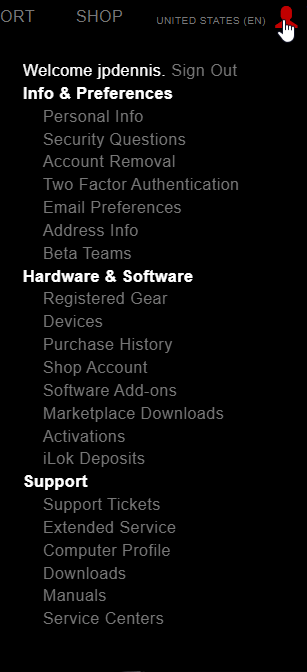
Also, have you authorized you computer yet? If you click on the person image form the main page once you're logged in you can then click on devices. You're Stadium should be linked and your computer should be authorized. If not reach out to support.

- Show previous comments 1 more
-
-
Did you install the drivers for the TASCAM Celesonic US-20x20 and Steinburg's MixKey? Not that I think it should be an issue. Also, when I was using the Hauppauge add-on daughter boards I did have issues with other capture devices. And it sounds like you used a vanilla Microsoft ISO.
However, at this point I am merely speculating and do not know what you should do next in your case. Have you reached back out to the Line 6 support engineers and asked them to dig deeper into your issue? You should be able to point then to the thread in the forum with the information you and I have discussed.
You are knowledgeable and capable with systems. I do not see any thing out of place with your thinking or logic. Good luck.
jpd
-

-
Helix Stadium editor disconnects from every ~20 seconds(WiFi connection)
jpdennis replied to mlong's topic in Helix Stadium
You may already know about the allow network issue for the Macs. Please forgive me if you do. If not, there is some information in the Knowledgebase area for the Stadium. I am not completely familiar with how the Macs configure power saver modes and/or the NIC device power saver settings. I have had to shut off power saver settings for my PC based systems. Forgive me if you've already done this. I am aware of how frustrating this can be. jpd -
Here is a link to the KB articles -> Helix Stadium is at the top and there are several bits of information concerning several of the issues we've been seeing. It also has timelines for fixes and some insight into future plans. For any possible bugs being seen that are not noted in the KB area, please create a support ticket. https://line6.com/support/page/kb/effects-controllers/ Here is a link to the manuals (full online manual and cheat sheet). You can use the left sidebar to fairly quickly find specific areas of interest. It has several video links https://line6.com/support/manuals/helixstadiumxlfloor
-
Follow jiml6's suggestion and let us all know if that works for you.
-
Helix Stadium - Midi "Note On" Instant Commands Unreliable
jpdennis replied to agentrm25's topic in Helix Stadium
Showcase may address this once the Showcase feature is ready for prime time, so to speak. Reach out to support to find out if it is a bug. The main Line 6 page has a box for this (normally lower left of the screen). -
ReverendLove, Again, I will be fairly detailed even if you already know much of this; First, are you running Windows 11 & are you familiar with the "dism" and "sfc" command prompt utility commands? Let me know before you attempt step 6. For those not familiar, the commands aren't really that scary. In fact I run these often on my system to keep the operating system running well. Also, I just use the copy and past via a screen capture program of your choice. I use Greenshot (a freeware program) for my screen captures and capture to clipboard then Ctrl+V (windows paste hot-key command) at the area in the message I want it to be in or at. Before you return it you can try this. And here is what I did on my computer once I sold my Helix Floor and the helix Stadium arrived. 1. Uninstall all Line 6 products EXCEPT Line 6 Helix Native. I did keep Line 6 Helix Native. And I did the uninstall via the Windows 11 Gear (settings) ->Apps -> Installed Apps. a. I uninstalled Helix stuff, Helix Stadium stuff, all current and older drivers, etc. I even uninstalled Line 6 Central 2. Go into the old windows "Control Panel" which you can do by typing the word control in the search window -> Programs and Features a. Uninstall everything Line 6 that is an uninstaller EXCEPT the Line 6 Helix Native Uninstaller b. Based upon what you had you may have several versions of the Line 6 Driver uninstall programs. And once you start you may get a message that is telling you the driver uninstaller can't be found. Just click to have it removed from the control panel 3. Reboot computer 4. Make sure you have the very latest Windows updates (I know this may be painful) 5. After your windows is updated and rebooted, please shutdown and do a cold startup 6. Next are the computer Windows 11 (also 10 but I'm aware Microsoft isn't supporting anything below 11 so if your computer is not Windows 11 go to 7.) You must open a command prompt (via search if not pinned to your taskbar like me), run as administrator on the system then run the following commands in this order a. dism /online /cleanup-image /checkhealth (this checks your system for any issues and if not found go to c. other wise go to b.) b. dism /online /cleanup-image /restorehealth (this could take an hour or so ... it normally appears to choke at 53% to 64% but it should be done in about an hour or so. You can tap the enter key a few times) c. sfc /verifyonly (this checks driver status and if errors found go to d. otherwise proceed to 7.) d. sfc /scannow 7. Oh yea, make sure you register your Helix Stadium if you haven't already, on the Line 6 site once you log back into the site. 8. Install the Helix Stadium app before installing any other Line 6 product 9. Install the Helix Stadium Driver 10. Plug in Helix Stadium using USB-C to USB-C cable nothing else and check again in Device Manager Let me know if this helps or if you'd like further information. And, again, you can bypass step 6. It is just that I find this helps out many things in the Windows operating system. And here is the best YouTube guru I've found for this process I've outlined in step 6 before you do anything. Please watch first if you haven't already jpd
-
Once you choose download -> Helix Stadium XL -> OS then go and you will see the following. Helix Stadium is the app. The confusion may lay in the first line starting "Please update ..." which can be an assumptive statement leading one to believe it is the firmware like the Helix was. But it is not. It is, in fact, the downloadable application. Let us know if this helped. jpd
-
True. I have noted the same in the Stadium App
-
Preset changing on Stadium far slower than OG
jpdennis replied to Axemadman74's topic in Helix Stadium
First: Any issue you discover can be sent to the support team, which we all highly recommend since this forum isn't actively monitored. It does help us all when you and others send these issue requests in to them. Second: I can understand. Line 6 have been extremely transparent in that the Stadium was released early knowing it is not complete due to the voluminous demand when they asked the Line 6 users if they wanted it now or after everything was ready for prime time, so to speak. The majority said they wanted it now and will await the firmware upgrades as they roll out just so they can have it now. This was not quite the same as the Helix Floor. though similar in that Line 6 engineers addressed all the issues as they were reported in a very timely fashion. Now they have set a time line for the 1.1 (day of launch), 1.2 (coming by year end hopefully), and 1.3 (by or right around NAMM). Here is a link to their Stadium info https://line6.com/support/page/kb/effects-controllers/helix_130/ And here is the first line (its clickable) in the above link which is referencing the reported issues to date, what they have or are doing, and what to be prepared for (note the "this article will be updated periodically" - Line 6 means it and will update just like they did for the Helix when it came out 15 years ago). I really want to see Showcase and then the model capture feature when it arrives. jpd -
Here is a very deep dive on my part. I like to give as complete as possible answers even if they may be more than required. I have several instances in the Device Manager. The digital audio Interface and Speakers In Audio I/O I have the Line 6 instance I also have one instance in Sound Video & game controllers as itself I also have a third HID Keyboard device when attached (screenshot w/ Stadium attached; w/o Stadium attached Here is a screenshot under Software Devices within Device manager It is an additional (third in my case) USB composite device with stadium w/o stadium I have looked in many other areas within Device Manager and do not see any other instances. And I can disconnect it via the USB manager within the USB device eject function I hope this is useful information for you. If nothing else you can refer the support team for your issue to this thread if needed. just plain dennis
-
Toggle bypass on 2 blocks assigned to same stomp
jpdennis replied to gbr13697's topic in Helix Stadium
You can do many things within the command center. Interestingly, the Helix would allow you to assign 8 FX blocks to a single footswitch based upon DSP. There is an old thread that said 8 or more blocks but I never needed that many. In fact I cannot remember using more that three. I predominantly used snapshots for the various parts of a song within a preset. I used command center if I wanted to have control over one or two FX blocks within the snapshot. I split my time in the command center for MIDI switching settings for my analog amp (Mesas Boogies using third party hardware relays units) when doing outside venues. In clubs and, with rare exception, under 5,000 enclosed shows I used just the Helix floor. I am awaiting the Showcase feature to be turned on for that "perfect number of footswitches" = zero jpd


