Search the Community
Showing results for tags 'stadium xl'.
Found 15 results
-
 Anyone else having issues with SPDIF on the Helix Stadium? I have recently purchased a Helix Stadium XL. I have been a long time user of Helix and Helix Rack, so I was pretty pumped to try this out, but have been plagued with issues in my recording set up. When I set my Stadium XL at 44.1 and set it to be the clock, putting my Scarlett 18i20 into input - Non-clock mode it works with really intermittent dropouts, maybe one every 25-30 minutes. When I put it into 48k, it works similarly, with some additional dropouts, but typically more like once every 10 or so minutes. It completely loses clock sync, then it syncs back up. Then when I try 96k, it straight out won't work. It just constantly flashes sync on and off. To be clear I have used this exact setup for years with my Helix floor and then Helix Rack with zero issues. And yes, I have swapped back and it continues to work perfectly. Troubleshooting I have tried: Factory reset the Helix Stadium XL Factory reset the Scarlett 18i20 Swapped the SPDIF cable Tried all options for SPIF output - Direct, 1/4",XLR and phones. All do the same except direct, but I do not need a DI output via SPDIF. I have a DI for that inline before the Stadium XL. Direct only puts out a clean guitar signal. Verified I do not get any popping or dropouts via XLR, 1/4" or Phones. This seems to be isolated to SPDIF, which is my primary recording interface preference. I have not yet tried a different interface, but I have a hard time believing that could be the issue because the SAME interface, with the SAME SPDIF cable has no issues on the Helix Rack. Before I go through the hassle of taking it back to the store and swapping, I just want to make sure I have ruled out everything. Anyone else experiencing this or did I just get a bad unit? Focustire Setting - 96k - Helix Stadium XL.mp4
 -
Hello!! apologies if this has already been asked about; I just haven’t seen. so I’ve had my stadium for about 7 months give or take. Absolutely LOVE it, I noticed when I played Friday night for the start of our set. I started with a guitar I normally don’t play with and when I plugged it in to get rocking the tuner STOPPED working and when I took it off the tuner it was giving me some crackling sounds. I switched guitars and it went away, but the tuner still isn’t working. I plug it into instrument 1 and the presets work just not the tuner. I do use this for bass and guitar gigs. I’m mainly a guitar player but occasionally fill in on bass. I have to plug into instrument 2 in order for the tuner to work. any advice on how to fix this?
-
Even though the transfer of WAV files (I have tried all kinds of formats) seems succesful, nothing shows up in my songs section on the Helix Stadium device itself. I have reformatted the SD card, but to no avail. I have tried modifying WAV files to mono, to 16 bit, to 24 bit, to 44KHz, to 48KHz. Also to no avail. Every time the transfer _seems_ succesful (no error messages whatsoever). But nothing appears in my Songs... Please help!
-
 I am coming from the original Helix Floor model and the Stadium XL (Helix 2 realistically) is amazing (traded my original floor in for the new Stadium XL). As much as I love it, I have 4 complaints about the new unit which may or may not be resolved, but I am going to throw them out there anyway....: 1. I really feel like the new Stadium should have been able to accept 'full backups' from the previous Helix Floor. I had to manually go through all my presets on the Stadium and make sure all of my IRs were in the right patches, in addition the expression pedal seems to default to expression 2 which I also had to fix because all my expression effects in each snapshot were on expression 1....really tedious. I had to manually put all my patches on the stadium twice actually because the first unit I bought was defective (all the presets didn't sound right going through my functioning headphones). All of this took an exorbitant amount of time. 2. I really like that the unit connects to the new Stadium Editor via wifi, however what I don't like is that in order to use the app it seems like it literally has to be connected to the wifi without any other cable connectivity options. Unless I am missing something I don't think it can connect to the editor through the type C cable port or the type A port.....Cables should be allowed to connect to the editor in my opinion with the option of also connecting via wifi. 3. Similar to complaint number 1, but I hope 'full backups' come to the Stadium Editor at some point so I can also put all of my patches on my computer in one fell swoop, instead of manually copying and pasting each individual preset into the folder. I know that there is a micro SD on Stadium and you can create backups there, but again more flexibility I am sure would be greatly appreciated to all the consumers of this great product. 4. Something else I noticed is that it doesn't seem like there is a way to order your presets on the Stadium itself. This seems to only be able to be done on the Stadium editor which is ridiculous because you could use the knobs on the original helix floor to order / move your presets around. Anyway these are just my thoughts so far, great device overall. Hope some of these complaints become addressed in future firmware updates
 -
 Hi everyone, I’m reaching out to see if anyone else is having trouble updating the Helix Stadium XL to the new v1.3 firmware. I’ve tried a couple of different methods, but I keep getting stuck with two specific errors: 1. Error -103: This happens every time I try to download the update directly via Wi-Fi on the unit. The download starts but fails shortly after with the "Download Failed!" message. 2. Response -4: When I try to push the update from my PC (using the desktop app), I get a "Something went wrong" popup with Response -4 right at the start of the process. I’m really excited to try the new Proxy Cloning Engine and the Matchstick 30 models, but I can’t get past these errors. Has anyone encountered this specific combo of codes? I've already checked my internet connection and tried restarting both the unit and the PC, but no luck so far. Any help or troubleshooting tips would be greatly appreciated!
 -
 Hi everyone, I’m trying to set up my Stadium XL for live use and could really use some advice on routing. My goal is: Send a stereo signal to FOH via the main XLR outputs (L/R) with full processing (amp + cab/IR) At the same time, send a mono signal to a guitar amp on stage for monitoring What I’m trying to figure out: What’s the best way to route a mono signal from one of the other outputs (1/4” or Send) to a guitar amp? Can I keep FOH stereo, but have the other output summed to mono independently? Is it possible for that mono output to exclude cab blocks (and possibly amp blocks), so it behaves more like a pedalboard or preamp into a real amp? Basically: FOH → stereo with amp + cab Stage amp → mono, no cab (and maybe no amp) What’s the cleanest way to achieve this? Split paths? Parallel routing? Separate outputs? If anyone has a similar setup or example preset, I’d really appreciate the help. Thanks in advance
 -
Tap tempo not working anymore? Used several times with external tap tampo last few gigs (the walrus audio canvas clock). Now this internal tap tempo doesn't work anymore. It is not updating the bpm when tapping FS 12. Help?
-
My apologies if this functionality already exists. I'd like to create an amp block (or any effect, really), then create a bunch of presets that use that amp block. But I don't want a separate copy of the amp block in each preset, I want a pointer/alias back to the original block. So if I decide to change that amp's settings, all the presets that point to that amp would also be updated.
-
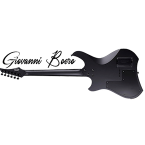 Who said a guitar designed for the future had to sound only "distorted"? Today, we're breaking down the boundaries of the genre. Take a Music Man Kaizen 7: a masterpiece of extreme, multi-scale design, born from the visionary mind of Tosin Abasi. It's a war machine designed for precision and power. Now, imagine trying to transport it to a smoky New York jazz club in 1954. Impossible? Not with the new Line 6 Helix Stadium. It's not the instrument that decides the genre, it's your sound chain ;-)
 -
Hello all! I'm new to my Helix StadiumXL and working on sending some midi commands to my amp. Question: In Command Center, can you send midi commands when you switch snapshots? It appears only able to do so using StompA or B and using the commands triggered loading the preset. Just wanted to double check I'm not missing something easy I can make it work using stomp mode but it would be nice to attach a midi out command to each snapshot switch. thanks!
-
Just got the Helix Stadium XL. I want to use it into a small mixer then from the mixer to PA Speakers. Any recommendations for PA speakers that work good with the Stadium XL? Thank You Will
-
To Line 6 Stadium developers: So how long will it be before we can expect a Stadium App to control Stadium family devices via Android & iOS???? It would be very useful at gigs, but would have to be Bluetooth connected rather than Wi-Fi to be useable for this purpose. In fact, it wouldn't be useful at home because the Windows app is better with a larger screen on a computer. This would be used at gigs where no Wi-Fi or computer is feasible. I assume this would require a firmware update since the Windows app only does Wi-Fi. It wouldn't have to be as functional as the full Stadium app for Windows or Mac. It would be useful even if it could only do things like editing or switching presets, switching the button board between pedalboard mode, preset mode, snapshot mode, etc. Maybe you you make it control looper and simple, general playback controls for the mode that plays WAV files. No need for editing via phone apps. It would be great! Make it so! Thanks Anyone else who agrees with the need for this, please comment and hopefully moderators can forward the interest to wherever/whomever it needs to be to make it happen.
-
New Vildhjarta Guitar & Bass tones just dropped! https://sbtones.com/product-category/helix/
-
 Morning Not a massive deal but copy and pasting a wah or gain block that has expression pedal latching etc from one preset to another results in the target blocks behaving very weirdly: the new blocks don't turn on with the toe down click on the expression pedal first time, but do the second time, but now the expression pedal is "off" and movement won't be registered. Deleting the pasted blocks and just creating new ones with the same switch assignments works fine. There you go.
 -
I often use either exp pedal per snapshot to control different block’s bypass state/parameters. For example, I have a preset in which I use Exp 1 in Snapshot 1 for certain effects. Then, in Snapshot 3, I use Exp 2 to control a tremolo. Stadium XL is not saving them.