
PierM
-
Posts
1,706 -
Joined
-
Last visited
-
Days Won
88
Everything posted by PierM
-
It's since march Im using my Iridium (and other Strymon pedals), and parked Helix modeling (imho Iridum plays in a different league). Using Helix primarly as a signal 'router' and to add some exotic stuff that I cant do with pedals. Really great stuff!
-
Yawn, the internet physics... https://www.fender.com/articles/how-to/get-rolling-5-dos-and-donts-for-transporting-your-amp
-
None of which would affect the tone. ...miss the days where people weren't so obessed by "new stuff", and youtube reviews... /oldfart Mode Off
-
If you cant transport in stand position, always speaker face down. This is the less stressful position for the speaker and everything attached to it.
-
Dunno, but I've the feeling you don't really have a cable/adapter issue there. Probably just something basic and silly, like when you search for your glasses for minutes, then you find out they are on top of your head. Anyway, I'd suggest you to download the AUM app from the apple store. I think it's still free. This app route anything to anywhere, does recognize any device connected through the lighting port with the adapter, and does unlock every single USB channel from/to your Helix, other than opening MIDI i/o talk with it. You don't need this app for your final goal, but if you can't "ping" your Helix with this app, then means the iPhone is probably the problem. I'm an intensive user of these toys. I do have 3 iPad from different gen, and 3 different camera kits. I never, ever, had any problem in any situation. It's a compliant protocol that just works like plugging a light into a wall socket, so if you said your Helix USB works fine in any other I/O task, and your USB cable does just works (really, never seen one of those cables not working), then the isolated variable here it's the iPhone. Model? OS? Time for a reset? Give AUM app a try, and see what happen. http://kymatica.com/apps/aum
-
If you have an original apple camera kit, the link it's pretty much straightforward and doesnt need any special setting. USB1/2 will pass through the Helix signal, out of the box. I have 3 Kits, they all works the same. Audio from the iPhone will be routed out of the USB, no matter what app you are using....easy peasy. USB cable straight into the back USB port of my Helix. https://www.dropbox.com/s/aajjjydsayj9uf7/IMG_0012.MOV?dl=0
-
This seems a faulty LCD unit, doubt it's software dependant. I'd contact support and raise a ticket. GL!
-
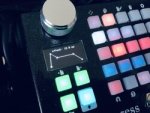
Blackstar Live Logic MIDI Controller.... Bought for advanced control of a Pigtronix Infinity, and it's just amazingly easy and efficient (and sturdy).
-

Has anyone tried the new 1.06 firmware for there G10T
PierM replied to PsychoPops's topic in Relay Digital Wireless
Because they rather you not downgrading than paying a million dollar lawsuit for a unit burning down your house. -
Has anyone tried the new 1.06 firmware for there G10T
PierM replied to PsychoPops's topic in Relay Digital Wireless
I think you can get around 3 hours with units pretty much new, but those which were getting ~2 hours after the 1.05, they'll be getting the same after 1.06, just without glitches during charging, which is good tho. I believe none of them lasts 6 hours as advertised. -
New 1.06 update is only for the transmitter (G10T).
-
They were probably worried about users dealing the old G10 firmware via PM....lol...(btw, yep, pm are gone)
-
What about barefoot translucent toppers (and setting no led at all for the off-status)? If you can't see those, then it's time for a eye-check. :D
-
Has anyone tried the new 1.06 firmware for there G10T
PierM replied to PsychoPops's topic in Relay Digital Wireless
The firmware does only fix the erratic behavior of the G10T when charging under warm environment, whatever this mean. Once charged, the battery lasts the same as 1.05; average 2.x hours. -
Awesome! :)
-
It's not possible to add Send/Return and Looper blocks within Helix Native. Those are only present when importing an hardware preset (but they do nothing, since there is no hardware for those functions).
-
Fair enough. :) As for my setup, yes and no. Pedalboard it's basically reproducing my typical setup on my average Helix patch, so it's redundant in terms of stuff I need. I'm now moving more on the pedalboard (quicker, more reliable, tone is better), and using Helix just for record and get a better routing for specific projects, but I'm fading out form using it outside the studio/home.
-
What about switching to Helix Rack? This way you'd have the main LCD in a completely different angle, and you can put it where you want. Also much easier to protect from the light. You also said you do a lot of "on the fly" editing, so this is another good reason to use a rack. I do use a rack, never had a problem under any kind of light, direct, diffuse, whatever. Another good thing of using a rack, in daylight conditions, it's that you can put fans on the back to the rack, to control overheating, which can be really bad under the sun, on a Helix floor. Just food for thought... :)
-
It would make it worse if Helix LCD were already sporting a polarized screen, which I don't think it is, since this should black out the vision through a polarized lens, and it doesn't (at least not on my Helix)... If you do this with an iPhone, which does indeed use a polarized LCD screen, then yeah, it would make it basically black. Anyway, was just an idea. In theory, you could achieve same thing using a polarized film for LCD screens, this should absorb a big part of glare, making the screen much more readable under direct light. With sunglasses, you would also see scribble strips and footswitch rings. I quickly did a short clip using a polarized lens for camera, just to show what I mean. https://www.dropbox.com/s/p5ct2lm7xgr5xcy/IMG_2872.mov?dl=0 More reference; http://www.lcdparts.net/Film3D.aspx
-
Have you tried wearing sunglasses with polarized lenses?
-
I installed the 1.06 on my brother's G10T, and battery duration seems pretty much the same (average 2h), but the erratic led flashing (red, then green then red, then red flashing base, white etc. etc..), seems fixed. Dunno if battery behavior will improve on next discharge/charge cycle, I'll keep monitoring it, but I guess what they fixed is the bad charger-receiver/transmitter communication, in warm environments (which would kinda explain the randomness of the glitches)...
-
Damn! Im selling my Helix Rack....but now Im curious.... :D
-
There is a firmware (1.06) for the G10T. Should take care of the flashing glitches. Not sure will improve the battery charge lifespan, but I'm happy they quickly reacted to a evident issue. "We have determined that certain Relay® G10T wireless transmitters with v1.05 firmware may not charge optimally within warm environments. The v1.06 firmware update addresses this issue to ensure correct charging behavior, as well as improving the response of the LED to more accurately display charging status. The v1.06 update also incorporates the important safety updates from the v1.05 firmware released in March of this year."
-
There is a firmware (1.06) for the G10T. Should take care of the flashing glitches. Not sure will improve the battery charge lifespan, but I'm happy they quickly reacted to a evident issue. "We have determined that certain Relay® G10T wireless transmitters with v1.05 firmware may not charge optimally within warm environments. The v1.06 firmware update addresses this issue to ensure correct charging behavior, as well as improving the response of the LED to more accurately display charging status. The v1.06 update also incorporates the important safety updates from the v1.05 firmware released in March of this year."
-
Rotary encoder is weld on the main LCD screen PCB. I can only think of a bad repair from someone who tried to fix it at home.

